

TL;DR: After months of configuration decisions, I’ve officially approved the final avionics panel for my Sling TSi. Designed and built by the talented team at Midwest Panel Builders, this setup brings together modern ergonomics, crisp integration, and future-facing flexibility. Here’s a guided tour of what’s on the panel—and why I think it’s the functional, ergonomic, and elegant.
Already covered: the big avionics choices. If you want the backstory on why I chose Garmin for this build, check out Inside the Panel: My Garmin-Powered Sling TSi Avionics Suite.
This post is all about the final panel layout: the clean, tailored, optimized-for-my-mission panel designed specifically for N117ZS.
Section 1: Avionics
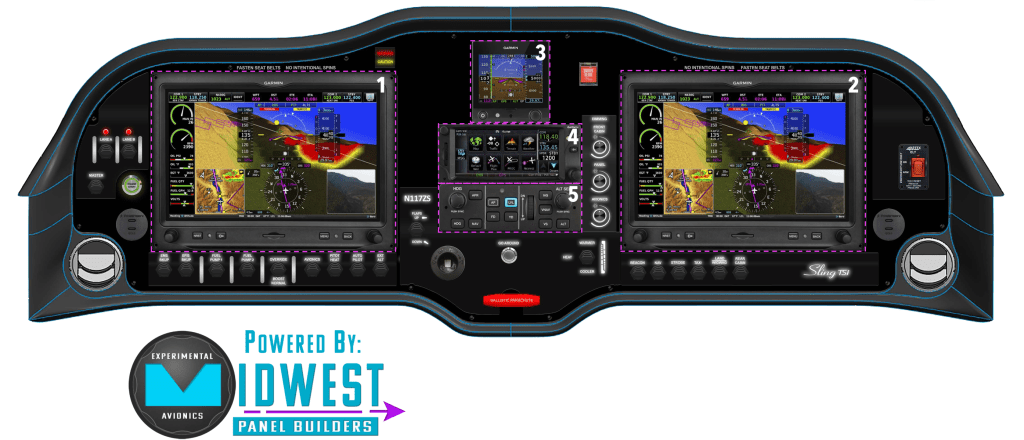
Let’s start with the stars of the show—my Garmin glass cockpit, all centered around modern integration, clean workflow, and built-in redundancy.
(1) + (2) Garmin G3X Touch (Primary Flight + MFD)
These dual G3X Touch screens are the heart of the cockpit—one for the primary flight display (PFD), the other configured as a multifunction display (MFD). Together, they bring in flight data, engine info, maps, weather, traffic, audio, autopilot—you name it. I can split-screen them, push data from one to the other, and even fly partial panel if one screen goes out.
Noteworthy: No separate radio panel is needed. All COM/NAV control is handled via the G3X interface, keeping the layout clean and uncluttered.
(3) Garmin G5 (Backup Attitude Indicator)
The G5 stands guard in case the G3X screens go dark. This backup EFIS provides essential attitude, airspeed, and altitude data—on a totally independent power and sensor source. It’s peace of mind in a tiny package.
(4) Garmin GTN 650Xi (GPS/NAV/COM)
The GTN 650Xi handles IFR navigation with blazing speed and a crisp touch screen. It brings IFR-certified GPS, VOR/ILS, and COM into the system with full integration into the G3X. I’ll use it primarily for flight planning, loading approaches, and tuning COM frequencies with a swipe and a tap.
(5) Garmin GFC 507 (Autopilot)
The digital copilot every pilot dreams of. The GFC 507 gives me rock-solid altitude hold, navigation tracking, approach modes, and envelope protection. All controlled via a clean, centrally mounted panel under the G3X.
Noteworthy: The vertical layout (PFD above, autopilot controller below) keeps my scan tight. It’s not just convenient—it’s efficient.
Section 2: Controls & Lighting — Switching On, Staying Lit
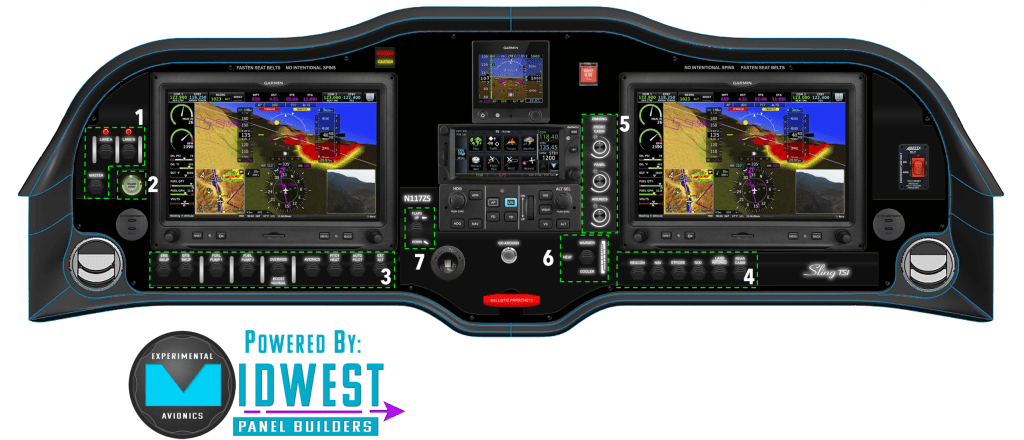
This section of the panel is all about operational control—powering systems, managing lighting, and (very importantly) starting the engine without fumbling for keys like it’s a 1980s Cessna.
(1) Master & Rotax Lane Switches
Here you’ll find the main electrical master switch and the dual “Lane A / Lane B” switches for the Rotax 916iS engine. Unlike legacy magneto systems, the Rotax FADEC (Full Authority Digital Engine Control) uses two redundant ECU channels—Lane A and Lane B—to manage engine performance and safety. Both are powered up independently during preflight and checked for proper function before every flight.
(2) Midwest IntelliKey (Electronic Start & Security)
This was an upgrade from the original plan—and one I’m very happy about. The IntelliKey system replaces the old-school mechanical key with a push-button digital start system tied to an RFID security fob. It’s a sleek, tamper-resistant solution designed by Midwest Panel Builders themselves.
(3) System Switches (Power & Environmental)
Here’s where we toggle critical systems:
- Battery 1 & 2
- Avionics Master
- Fuel pumps
- Pitot heat
- Autopilot master
- External alternator
Each switch is clearly labeled and placed within ergonomic reach, designed for ease of flow during startup and shutdown procedures.
(4) External and Cabin Lighting Switches
A dedicated block of switches controls all nav, strobe, landing, taxi, and internal cabin lights (rear passengers included). The layout is grouped by function, so muscle memory builds fast.
(5) Panel & Instrument Lighting (Backlighting Options)
Here we get into some of the more subtle touches. Midwest offers two panel backlighting options:
- Flush LED backlighting (embedded behind laser-etched labels)
- Raised lettering with integrated lighting
I went with the partly raised backlighting—not because flush wasn’t cool, but because I wasn’t ready to spend an extra $2K for aesthetics. The raised lettering still looks great in low light and gets the job done. Sometimes “good enough” really is perfect.
(6) Cabin Heat Controls
Located at the base of the panel—clean, accessible, and analog-simple. No surprise automation here. If it’s cold, I’ll twist a knob. Simple.
(7) Flap Control Toggle
Yes, I have a flap switch here. But truthfully, I expect to use the grip-mounted flap controls (both pilot and copilot side) almost exclusively. Still, it’s nice to have the option.
Noteworthy: There are no fuses or mechanical circuit breakers on this panel. Instead, everything is managed through the Vertical Power VPX Pro electronic circuit breaker system, integrated directly into the G3X. It allows for automatic load shedding, monitoring, and reset—without ever pulling a breaker.
🔗 Want to dig deeper? See this blog post on why I chose the VPX Pro system (you’ll insert the actual link).
Section 3: Safety Systems — Warnings, Buttons, and Backups
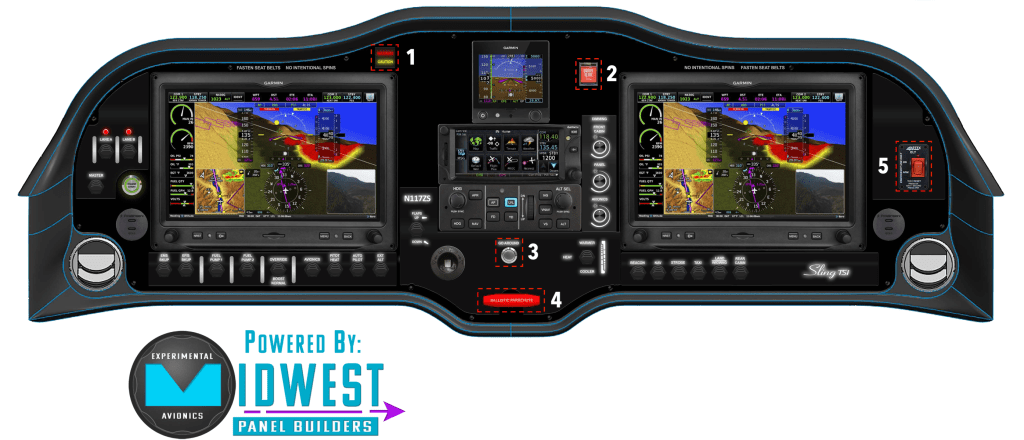
Some systems you hope to use every flight. Others… you hope you never touch. This section of the panel focuses on visibility, alerting, and safety-critical features—both electronic and ballistic.
(1) Caution/Warning Light & Acknowledge Button
Garmin’s G3X system includes a visual and audible alerting system, but this added caution/warning light provides a secondary cue—especially useful when your eyes are outside the cockpit or your brain is in task-saturation mode.
When a caution or warning triggers, this light flashes. Pressing the button doesn’t cancel the alert—it simply stops the light from flashing like a disco strobe in turbulence.
(2) Smart Glide Button — The Magenta Lifeline
This unassuming button could become your best friend in the worst moment.
SmartGlide is part of the Garmin G3X/GTN ecosystem, and it’s exactly what it sounds like: a single-press emergency glide advisor. If you experience a total engine failure, pressing this button initiates a rapid cascade of calculations and overlays on your primary flight display.
What happens when you push it?
- A magenta glide ring appears around your aircraft on the G3X and GTN maps showing your maximum reach, based on current altitude, wind, terrain, and aircraft glide characteristics.
- The system identifies and highlights reachable airports and suitable off-field landing locations—ranked by distance and relative safety.
- Terrain alerting and color-coded elevation data adjust dynamically so you’re never guessing what’s ahead.
- If paired with the autopilot (and it is), you can even engage NAV to fly directly toward the selected safe landing point.
This isn’t just a map feature—it’s a decision-making accelerator. In an engine-out scenario, time and mental bandwidth are in short supply. SafeGlide offloads the complex math and lets you focus on flying the airplane and managing the emergency. It’s the modern version of “best glide speed + nearest airport” turned into a tap-and-go assistant. In my case, that’s worth its weight in Avgas.
(3) Go-Around Button
Mounted where I can hit it without fumbling during a botched approach, this button commands the GFC 507 autopilot to:
- Pitch up to a safe climb attitude
- Apply TOGA power settings (in advisory mode)
- Sequence the next leg of your missed approach in the GTN
(4) Ballistic Parachute Deployment Handle
You may recall I went all-in on the safety side and opted for a whole-airplane parachute system. It adds about 50 pounds and a healthy amount to the cost, but in an engine-out scenario over rough terrain, it’s a literal lifesaver.
Noteworthy: This panel-mounted handle is the final link in that safety chain. Pulling it deploys a rocket-propelled chute that can bring the entire plane down intact.
🔗 More on my parachute decision here: “Chute Happens: Why I’m All-In on a Parachute for My Sling TSi”
(5) ELT Remote Switch
This panel-mounted remote switch is connected to the Emergency Locator Transmitter (ELT), which automatically activates during a crash or hard impact. The switch allows for manual activation as well. It’s part of the aircraft’s passive safety layer—working even if you can’t.
Section 4: Power & Propeller Controller — Charging, Climbing, and What’s Coming Next
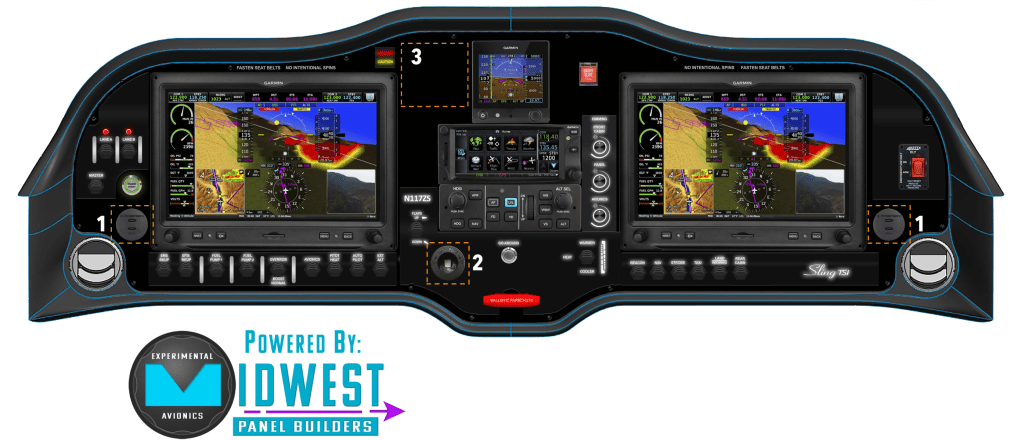
These aren’t just utility ports and placeholders—they’re part of the mission design. Long cross-country flights, high-altitude oxygen use, and propeller control flexibility are all built into the panel from day one.
(1) USB-C Charging Ports (Pilot & Copilot)
No more fighting over charging real estate. I’ve included dual USB-C power ports, one for the pilot and one for the copilot, to keep tablets, phones, ANR headsets, or portable gadgets topped up.
(2) 12V “Cigarette Lighter” Port for Oxygen Concentrator
This 12V socket is specifically wired for use with a portable oxygen system—especially important for our long, high-altitude missions.
This port supports my chosen oxygen solution: the Imogen Aviator O₂ Concentrator, a portable, compressor-based system that makes its own oxygen from ambient air. No bottles. No refills.
🔗 Read more here: “Oxygen Without the Hassle: My Decision for the Sling TSi“
(3) Airmaster Propeller Controller Placeholder
While the final propeller decision hasn’t been locked in (I’m still waiting on updated data from the Airplane Factory), I’ve reserved a spot on the panel for the Airmaster propeller controller.
If I choose the Airmaster constant-speed prop, this controller will be installed here. It includes preset modes for takeoff, climb, cruise, and hold—all managed with a simple button interface.
For now, it’s just a blank spot. But that blank spot means I’m not locked into a decision. Future-proofing is underrated—and this panel was designed with room to evolve.
Wrapping Up: A Panel with Purpose
The finalized panel for N117ZS isn’t just a collection of gadgets—it’s a carefully integrated system, designed for cross-country travel, modern avionics functionality, and pilot-friendly ergonomics. Every switch, port, and screen reflects a balance of mission needs, safety priorities, and cost trade-offs.
“Simplicity is not the absence of clutter. That’s a consequence of simplicity. Simplicity is somehow essentially describing the purpose and place of an object and product.”
Johny Ive, Apple, Chief Design Officer





 Slingology - Building and Flying a Sling TSi
Leave a comment