
Release 26.04 – 02/05/26
Release 26.04 focuses on improving correctness and clarity in directive and Service Bulletin workflows, especially as community-shared SBs become more central.
Bug Fixes
- Fixed an issue where changing a directive category (e.g. Airframe → Engine) did not reset the linked equipment, causing incorrect equipment to appear in the dropdown.
- Fixed a database error when updating directives that use calendar-based initial due dates.
Enhancements
- Increased the terminating action summary limit from 255 to 1000 characters and converted it to a multi-line text field for better readability.
- Updated list views for both aircraft directives and Community Service Bulletins to surface more relevant information.
- Improved applicability fields in SBs and Community SBs to clearly distinguish generic SB applicability from user- and aircraft-specific decisions.
- Community SB adoption into local SB now creates a history record for better traceability.
- Updated admin and user profile views with improved database record statistics.
Release 26.03 – 01/27/26
Release 26.03 continues the move toward more collaborative maintenance workflows and more accurate financial modeling, while addressing a few practical gaps discovered through real-world use.
New: Community Service Bulletin Sharing
This release introduces community-based Service Bulletin (SB) sharing.
Owners can now share structured Service Bulletins with the SlingologyMX community, reducing duplicated effort and inconsistent interpretations. A shared SB can be adopted into an individual aircraft’s log, at which point it becomes part of that aircraft’s local directive set and can be evaluated for applicability and compliance just like any other SB.
The workflow is intentionally conservative and owner-centric:
- Owners can publish SBs to a shared pool for others to reference
- Other owners can adopt a shared SB into their own aircraft records
- Community members can provide feedback on shared SBs, helping improve clarity and surface edge cases
- Each shared SB has an owner responsible for maintaining its definition over time, including updates and corrections
This approach separates shared knowledge from local responsibility. SlingologyMX does not determine applicability or compliance and does not create authoritative or “approved” SBs. It simply provides a way to share structured starting points.
Fixes & Improvements
- A bug that prevented the creation of manual notification entries has been fixed.
- Added Software and Database version fields in the Directives & Bulletins record.
- When creating a commitment (for example, an avionics or chart subscription), the system can now optionally generate transactions that occurred in the past. With the user’s explicit permission, SlingologyMX will backfill historical transactions based on the commitment’s start date and recurrence pattern. For example, if a weekly subscription started last month, the system can automatically generate the corresponding weekly transactions up to the present. This makes it easier to model ongoing costs accurately without manually recreating past activity.
26.02 – 01/09/25
This release introduces financial planning enhancements and improves correctness and reliability in core operational workflows.
New: Reserves
Reserves have been added as a first-class financial concept.
Reserves represent planned future costs that accrue over time based on usage or calendar intervals (for example: engine overhaul, propeller overhaul, major inspections, or other predictable high-cost events).
Reserves allow owners to:
- Allocate cost gradually rather than treating major events as surprises
- View a truer picture of hourly and long-term ownership cost
- Separate planned future obligations from day-to-day transactions
Reserves are analytical in nature and do not replace actual transactions.
New: Insights
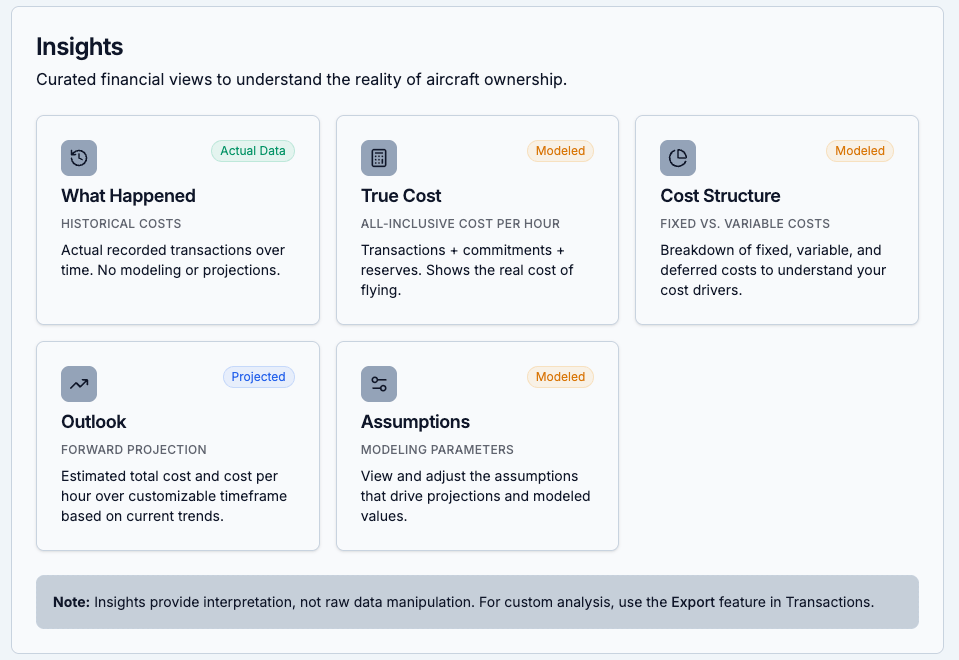
A new Insights section has been introduced to provide higher-level visibility into aircraft ownership data.
Currently available insights include:
- What Happened
A historical view of recorded activity and costs over a selected period. - Outlook
A forward-looking projection based on existing data, assumptions, and recurring patterns.
This is not calendar-year bound and adapts to the selected analysis window. - True Cost
A consolidated view that combines actual transactions with amortized and reserved costs to reflect the effective cost of operation. - Assumptions
An explicit view of the assumptions used in calculations and projections, making estimates transparent and adjustable rather than implicit.
Insights are designed to support planning and understanding, not prediction guarantees.
Fixes & Improvements
- Fixed multiple issues related to global counter editing, ensuring consistent updates across dependent records
- Improved reliability of automatic transaction creation from maintenance entries
- General correctness and consistency improvements in counter-driven workflows
Release 26.01 – 01/05/26
This release focuses on improving financial tracking, notification accuracy, and data consistency across maintenance and counters, while adding important profile-level settings.
Notification Fixes
- Fixed recurring notification behavior for commitments so notifications are now created for the next recurrence, rather than the original start date.
Counter Improvements
- Fixed multiple bugs related to counter values and updates.
- Counter values are now automatically updated when entered during maintenance or in other relevant workflows.
- Maintenance records now require counter fields where applicable, improving accuracy and consistency.
Financial Tracking Enhancements
- Transactions have been introduced as a new record type.
- Transactions are now automatically created from:
- Commitments (recurring financial obligations)
- Maintenance records (maintenance-related costs)
These changes lay the foundation for future financial reporting and analysis.
Profile Settings
- Added currency selection in the user profile.
- Added timezone configuration to ensure dates and events align with the user’s local time.
Data Import & Export Updates
- Export and import functionality has been updated to reflect the new financial records, counter behavior, and profile settings introduced in this release.
Release 25.03 – 12/30/25
This release introduces the first building blocks for managing aircraft financial records, laying the groundwork for future cost tracking and analysis.
- Financials Section Introduced: An initial Financials section has been added to the menu structure. This marks the first phase of tracking aircraft-related financial information directly within the system.
- Subscriptions Renamed to Commitments: Subscriptions have been moved under Financials and renamed Commitments. This change reflects a broader scope, allowing you to track recurring costs beyond subscriptions, such as hangar rent, insurance, and other ongoing obligations.
- Enhanced Commitment Records: The Commitment record has been updated to capture additional metadata needed for future transaction tracking and financial analysis. These changes are foundational and enable more advanced financial features in upcoming releases.
Release 25.02 – 12/28/25
This release focuses on improving visibility, organization, and multi-aircraft support, while continuing to refine the overall user experience.
Multi-Aircraft Support
You can now manage up to four airplanes under a single user profile. Each airplane is a completely separate entity with its own maintenance records, counters, directives, notifications, equipment, and history. This makes it easy to switch between aircraft without mixing data or workflows.
History Page Redesign
The History page has been fully rewritten. Instead of separate tabs per record type, all historical events are now combined into a single unified view.
The new view supports:
- Full filtering and sorting
- Clicking any row to view, edit, or delete the underlying record
This provides a clearer audit trail and makes it easier to understand how events relate over time.
Consistent List Views
All record list views have been updated for consistency. Each list now presents the most relevant information in a clearer, more uniform layout, reducing friction when moving between different parts of the application.
Admin Notifications
Admin users are now notified when:
- New users register
- New feature requests are submitted
- New bug reports are filed
This helps improve responsiveness and visibility during the Early Adopter phase.
25.01 – 12/24/25
Equipment Tracking
- New “Equipment” record category: Track aircraft-related equipment in one place, including installed and portable items.
- Centralized equipment inventory: Store key details such as manufacturer, model/part number, serial number, category, and notes.
- Warranty tracking with reminders: Enter warranty expiration dates and automatically receive notifications before warranties expire.
- Calendar integration: Warranty expiration dates now appear in the calendar view for better planning and visibility.
- Directives linked to equipment: Associate directives with specific equipment items, capturing identifying details at the time of association for historical accuracy.
- Improved history tracking: Equipment creation, updates, serial number changes, and deletions are now recorded in the History log.
- Export support: Equipment data can be exported in JSON and Excel, including equipment references in directive exports.
Miscellaneous
- Added Tag auto complete capability.




 Slingology - Building and Flying a Sling TSi