
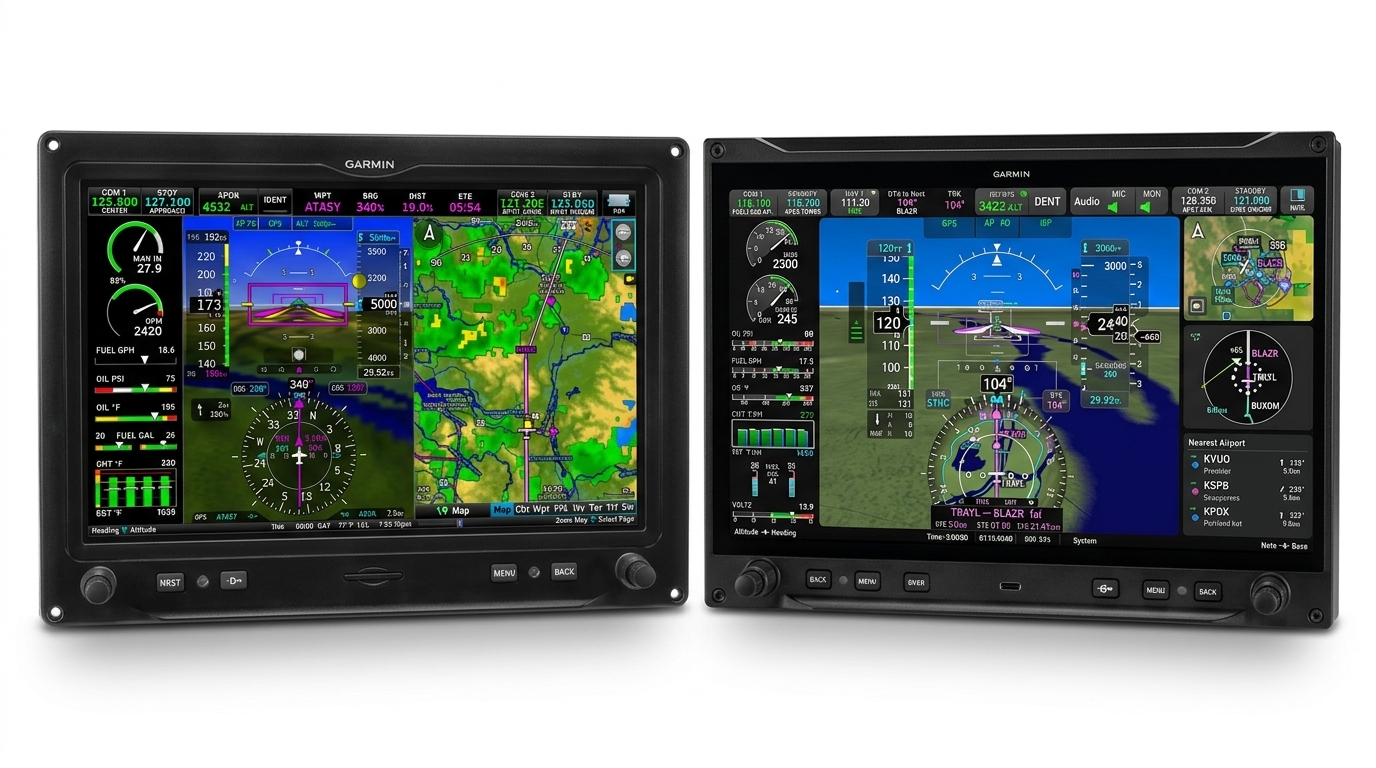
Most avionics upgrade stories start the same way: something in the panel is old, parts support is thinning, and a new box solves a real problem. That’s not this story. Roci’s panel is brand new — dual G3X Touch displays, a Garmin GTN 650Xi doing the navigating, a GFC 507 flying the autopilot modes, a GMA handling audio, all of it current and none of it struggling. Nothing in the stack needs replacing.
Then Garmin announced AXIS, and the question stopped being hypothetical. My first reaction to the announcement was wanting it — it looked genuinely cool, and that pull toward new avionics is real for me regardless of the spreadsheet. The bummer came right after, reading through the initial coverage: I’d just finished a panel I was happy with, and it didn’t look like there was enough genuinely new capability to justify tearing into a system that already worked. That held until AirVenture, where I spent twenty minutes at one of Garmin’s AXIS demo panels actually running my thumb across the widgets and the flight plan editor instead of reading a spec sheet about them. Watching the interface respond, not reading about it, is what turned “why would I bother” into “wait, what would this actually cost me.”
AXIS’s headline pitch is consolidation — folding a navigator, radios, and an audio panel into the display itself — and that doesn’t apply here, since all three are recent and staying put. What’s left is a narrower question: does what remains — a better display, a handful of genuinely new safety and workflow features, an early look at where Garmin’s taking this platform — add up to worth it, on a panel that already works?
That’s the question this post answers, with details a generic review couldn’t have: what navigator you’re running, what’s wired for redundancy, and what a resale market does to a net-cost number six weeks after launch.
What AXIS Is, Briefly
Garmin announced AXIS on July 8, 2026 — an all-new family of flight displays designed from the ground up to offer a highly integrated and flexible cockpit display solution. G3X Touch isn’t being discontinued — Garmin has said it remains a supported, current product — but AXIS is now the newer platform sitting alongside it, and for anyone buying displays today, it’s effectively what a display upgrade means going forward.
Strip away the marketing and AXIS is really three separate things bundled under one name:
- Avionics consolidation. Certain AXIS models fold a built-in IFR GPS, NAV/COMM radio, and audio panel directly into the display — Garmin calls this an industry-first. This is the tier that eliminates separate boxes. It’s also the part that doesn’t apply to Roci, since the GTN 650Xi, GFC 507, and GMA are all staying exactly where they are.
- Usability improvements. A larger, higher-resolution display, PFD widgets, an HSI map overlay, 3D SafeTaxi, and enhanced synthetic vision — the same underlying functions G3X Touch has, done better.
- New features. Capabilities G3X Touch doesn’t have at all: Runway Occupancy Awareness, SurfaceWatch, Database Concierge, a bezel emergency button, HDMI camera input, USB-C. This is the category we spent most of our research time in, since it’s the one that actually changes what the airplane can do.
AXIS shares many of the same navigators, radios, modules, and sensors as G3X Touch, and — the detail that matters most for a panel like Roci’s — it uses the same panel cutouts and mounting points. AVweb’s briefing with Garmin put a number on that: most G3X Touch upgrades are expected to need about eight connector pin changes and roughly a day of shop time.
Sit with AXIS for five minutes and the lineage is obvious: this is trickle-down avionics, and Garmin says so directly. The user interface architecture comes straight from the G3000/G5000 PRIME — Garmin’s newest business-jet flight deck — reworked for a GA panel a tenth the price. But the more interesting borrowing is from the other end of Garmin’s product line: the row of app icons along the bottom of the screen, the tap-to-get-waypoint-info radial menu on the map — both lifted directly from the Garmin Pilot EFB app, according to Garmin’s own Josh Plank at the AOPA demo. It’s an unusual design move for a panel-mounted flight display to borrow its interaction patterns from a phone app rather than the other way around, but it fits how most pilots under 40 actually learned to read a moving map — on an iPad, not a GNS 430. The result is a system that pattern-matches to two things pilots already know instead of asking them to learn a third.

For Roci, the relevant model is the GDU 116BX — the experimental, display-only variant, with no built-in navigator or radio. So of the three things AXIS is, Roci is buying exactly two: usability improvements and new features, with zero consolidation benefit. That’s the actual scope of this upgrade, and the frame for everything that follows.
Two structural facts to plan around. First, there’s no mixing generations — dual G3X Touch installs replace both screens or neither; there’s no staged, one-at-a-time path. Second, not everything in the announcement is actually shipping yet. The 8-inch displays, certified twin EIS, and GFC 600 compatibility are slated for early 2027 — “coming soon” in Garmin’s language, not available now.

The Cost Math
Two AXIS displays for Roci, installed, run $11,500 — $10,000 for the pair of GDU 116BX units and $1,500 in labor, per the final shop quote. That’s the number that stops most owners at “no.” But it’s the wrong number to decide on.
The other side of the ledger is what the outgoing G3X Touch displays are worth. The AXIS launch created an almost immediate secondary market: AvBrief reported, in the first week after the announcement, that new or barely-used 10.6-inch G3X Touch displays were fetching around $3,000 each, with kit builders who’d never even installed theirs cashing out to help fund an AXIS upgrade. A few weeks later, in a follow-up survey of G3X Touch owners, that number had drifted up to as much as $3,500 a screen. Call it $5,000 for Roci’s pair, a reasonable middle estimate.
$11,500 minus $5,000 puts the real number at $6,500 net — for two displays with no new navigator, no new radio, and no new audio panel. That’s the figure worth arguing about, not the sticker price.

The $5,000 above is now a locked buyout quote for Roci specifically, not a market estimate — so that part of the number is settled. The broader caution still applies for anyone else running this math on their own timeline: AvBrief’s own reporting flags that most owners who already have a capable GTN 650Xi and audio panel won’t need to touch them — it’s specifically the displays driving this secondary market, which means supply is about to grow. Every G3X Touch owner working through this same math is a potential future seller, and a market that’s absorbing a trickle of early-adopter screens now may look very different once it’s absorbing a flood. If you’re still deciding, waiting doesn’t just delay the upgrade — it’s a bet that the resale credit holds, and the early evidence points the other way.
What’s Genuinely New vs. Just a Better Screen
Garmin’s own feature list mixes three different kinds of change, and they matter differently to a decision. Sorted out for Roci’s actual configuration:
Genuinely new — Roci doesn’t have this today
- Runway Occupancy Awareness (ROA). Uses ADS-B traffic to alert on potential runway incursions from airborne aircraft, taxiing aircraft, and ground vehicles, and it’s standard if the aircraft has a compatible ADS-B transponder. One caveat worth flagging for other GNX 375 owners: a Garmin rep confirmed on Van’s Air Force that GNX 375 ADS-B data does not enable ROA — a GTX 345/45 is required.
- SurfaceWatch. Aural and visual cues against a wrong-runway or wrong-taxiway takeoff or landing. Garmin’s own Pilot’s Guide for Experimental Aircraft lists it as a paid enablement — optional, not bundled free with the display.
- PFD widgets and HSI map overlay. Three configurable widgets on the PFD itself (map, flight plan, weather, traffic, nearest), plus map data embedded directly in the HSI. G3X Touch has none of this.
- Database Concierge, for the displays. Owners have been asking Garmin to enable wireless database updates on G3X Touch since at least 2020 — a Garmin rep’s answer on record: “We do not have any plans to incorporate Database Concierge into the G3X Touch system.” A G3X owner on Mooneyspace confirmed it plainly in 2024: “The G3X doesn’t support Database Concierge.” AXIS finally turns that on — SD card ritual replaced with a wireless push.
- HDMI camera input, USB-C, built-in Wi-Fi/Bluetooth. New I/O, not present on the GDU 460.
- A dedicated emergency button on the bezel — with a caveat, below.
Improved — same capability, better execution
- The 11.6″ full-HD panel itself, versus the 10.6″ G3X Touch.
- 3D SafeTaxi. G3X Touch has SafeTaxi; AXIS adds the exocentric 3D view, taxiway/runway markings, signage, and structures.
- Enhanced Synthetic Vision Technology — more realistic terrain, shadow, and lighting on a feature Roci already runs.
New in name, not actually usable
- PlaneSync — automatic database downloads, remote aircraft status, automatic flight-log upload — runs through the GDL 60 datalink. Roci doesn’t have one, and buying one wouldn’t help yet either: GDL 60 compatibility itself is listed among AXIS’s “coming soon” items, not something shipping today.
A regression, at launch
- Checklists. One VAF poster asked directly whether the “coming soon” checklists would be the older G3X-style checklists (more formatting support) or the newer Garmin Pilot-style checklists (less formatting, but functions like nearest weather frequency) — worth checking current status with a dealer before ordering if this is part of your flow, since it’s a capability you’d be temporarily giving up.
The Smart Glide correction
AXIS markets the bezel emergency button as new, and it is new hardware — but Roci already has one-press Smart Glide activation through a dedicated panel switch, wired to do exactly that one thing. The AXIS button isn’t a new capability so much as a consolidation: one button that now also reaches level mode, a 180° turn, and the emergency squawk code, alongside Smart Glide. Real value, just not the value the marketing implies at first read.
The GTN 650Xi Finding
This is the section that took the most digging, and it’s the one that actually decides the post — because whether AXIS solves the one thing I wanted solved depends entirely on which navigator is behind the panel.
Garmin’s rep confirmed directly on Van’s Air Force that “the fully integrated seamless flight plan syncing only occurs on HSDB navigators” — GPS 175, GNC 355, GNX 375, and GTN Xi. Roci’s GTN 650Xi is on that list. That means the workaround I live with today — switch the display to internal GPS mode, edit, switch back — goes away. The flight plan can be modified from either box, approaches can be activated from the AXIS display, and the two stay in sync without the round trip.
The cost of unlocking it is real, not hidden. The same rep specified that “only the GTN Xi and GTX 45R would require a slightly different wiring architecture, with the addition of the HSDB network” — everything else on a typical G3X LRU list stays as-is. That line item is now settled: the shop’s final quote includes the HSDB run, folded into the $1,500 install figure above. No more waiting on numbers here.
Keep the GAD 29
There’s a redundancy decision buried in this upgrade that’s easy to wave off as a leftover part. The GAD 29 can technically be eliminated in favor of HSDB — but a Garmin rep laid out exactly what that costs in a dedicated Van’s Air Force thread on the subject: “If you have a GTN Xi, and AXIS display, and a G5, and the AXIS display fails, the GTN Xi data will not crossfill to the G5. If a GAD 29 is installed, it will. This is an economical way to achieve increased system redundancy for aircraft to be flown in IMC.”
Roci already has the GAD 29, already flies IFR, and the part costs nothing to retain. The failure mode it protects against — losing GTN Xi data on the G5 standby, in IMC, if the AXIS display goes dark — is exactly the scenario a standby instrument exists for. This is worth saying out loud to the shop before a “let’s simplify the wiring” conversation quietly drops it, since the same thread notes other builders discovering after the fact that the GAD 29 loss meant losing vertical and horizontal deviation data on an approach, not just a cosmetic backup feed.
Database costs stay a wash through this whole change: the AXIS experimental North America bundle plus GTN 650Xi navigation data lands at the same combined spend as the current G3X and GTN databases — no new subscription line to budget for.
If I Were Building Today
Everything above assumes a panel that already exists. If Roci didn’t — if this were a from-scratch build starting today — the calculus changes enough that it’s barely a debate. Worth a section, even though it’s not the decision in front of me.
The pricing, from a builder’s real quote posted on Bearhawk Forums: the GDU 116NC — the flagship model with integrated IFR NAV/COM, replacing a GTN Xi, radio, and audio panel — runs $20,780. The GDU 116BX, the base display-only model this whole post is about, runs $4,980.
Pairing one 116NC (as the PFD, doing double duty as the navigator and radio) with one 116BX (as a companion MFD) against building the traditional way — two G3X Touch displays, a GTN 650Xi, a GMA 245R audio panel — lands close to a wash:

That builder’s own conclusion, after getting quotes both ways: the AXIS path actually saved about $10,000 against their G3X-plus-GTN-650Xi quote — “and that’s not counting the elimination of the center radio stack and clean panel.” That specific number reflects one shop’s quote and one panel’s scope, so I’d treat it as directional rather than universal, but it lines up with the broader pattern: building new with AXIS is not a premium path. It’s close to cost-neutral against the components it replaces, and it comes with a bezel’s worth of new safety features and years more runway before the next platform shift.
For a builder starting today, this is close to a no-brainer. For Roci, none of this is the point — the panel exists, the components are recent, and the question was never “which platform to build with.” It’s “does upgrading out of a panel that already works clear a bar worth $6,500.” That’s a different question, and the build-new math doesn’t answer it — it just confirms that the platform itself is a sound one to be on.
Maturity, and Why That Cuts My Way
AXIS is about seven weeks old as I write this. The 11.6″ displays hold FAA/EASA TSO certification and are genuinely shipping — this isn’t vaporware — but Garmin’s own roadmap is explicit that the 8″ displays, certified twin EIS, and GFC 600 compatibility are still ahead, not behind.
What that looks like in practice: one builder documented their upgrade on Van’s Air Force, reporting the mechanical install as “truly a snap if you know what you’re doing” — but also noting they were still waiting on Garmin’s first AXIS software update, and that their G5 needed a firmware update (v8.70) before it would even interface with the new display. That’s the state of a brand-new platform: solid hardware, install manual that works, software and cross-compatibility still catching up in real time.
There’s no forced obsolescence pushing this decision, either. A Garmin rep confirmed on the same forum: “We will continue to sell G3X Touch displays and support new installations, including periodic software updates.” Owners who don’t need what AXIS adds can keep buying G3X Touch. Nothing about this upgrade is a deadline — it’s a choice to move early.
And for me, that’s the part worth saying plainly rather than treating as a caveat: I like being early. That’s not a risk I’m talking myself into — it’s the same instinct behind building and flying Roci in the first place. Being one of the first owners to work through a clean-sheet platform, and writing about what actually happens rather than what the press release says, is closer to the point of this blog than a hedge against it. AVweb’s hands-on reporting suggests the day-to-day transition should be painless regardless: “those familiar with G3X panels in particular should feel very much at home with AXIS.” The learning curve isn’t the risk here. The risk is buying into a platform still filling in its feature list — and for a lot of buyers, that’s a real downside. For me, it’s closer to the point.
The Decision
Stripped of everything else, this comes down to two separate questions — and I think they’re worth keeping separate rather than folding into one ROI number, because they have different kinds of answers.
The rational test. Would $6,500 net be worth spending, unprompted, for: a materially better display, panel-wide flight plan editing on the AXIS screen instead of the GTN’s small face, Runway Occupancy Awareness and SurfaceWatch, 3D SafeTaxi, PFD widgets, and Database Concierge finally replacing the SD-card ritual — against a seven-week-old product still filling in its feature list? On its own terms, yes. The new-feature list is real, not padding, and the GTN 650Xi finding means the workflow change I actually wanted is genuinely available on this panel, not just marketed at it.
The timing test. Independent of whether it’s worth it: does waiting make it a better decision? The evidence points no. The resale credit that makes this $6,500 instead of $11,500 was already softening in the broader market as more owners listed their G3X Touch displays — and now that the shop quote is final and locked in for Roci specifically, waiting only pushes the install date out, it doesn’t improve the number.
One thing I’d rather say directly than dress up as analysis: the pull toward new avionics is real for me, independent of any of this math, and I don’t think that needs an ROI justification to be a legitimate reason. It’s a different kind of reason than “it pencils out” — but it’s not a lesser one, and I’d rather say so plainly than let the math carry more weight than it actually did in the decision.
The next step is all about logistics, the number is final, and it’s a matter of getting on the shop’s schedule. I plan to work through this install alongside the avionics shop rather than just dropping the airplane off, which means learning the actual architecture — the wiring, the HSDB topology — hands-on. That’s time at the bench I didn’t get at The Airplane Factory, where the build was factory-centric by design. This is a chance to close some of that gap on my own terms.




Leave a Reply